




Account switching
Do you like Tatra banka’s innovative banking? Switch to us and we will handle the transfer of your account and payment services for you.
With a new account, you can now receive a 50 EUR reward for successful online account switching and have the account maintained for up to 3 years free of charge.

Convenient and worry-free

Fully digitally via the Tatra banka app, Internet bankingTB or at a branch

We will also help you redirect your income
Benefits
We will handle everything you need free of charge:
- we will transfer standing orders and SEPA direct debits,
- we will arrange the transfer of the amount of funds you specify, or even the entire balance from the account at your original bank, if you also request its closure.
You can request account switching online immediately when opening an account or later in Tatra banka digital banking, or at a branch.
Income redirection
If you wish, we will also help you change your salary account with your employer.
- At a branch: we will send the request to change your salary account directly to your employer’s address.
- Online: after submitting the account switching request, we will send information to your app containing a predefined email that you can simply send to your employer.

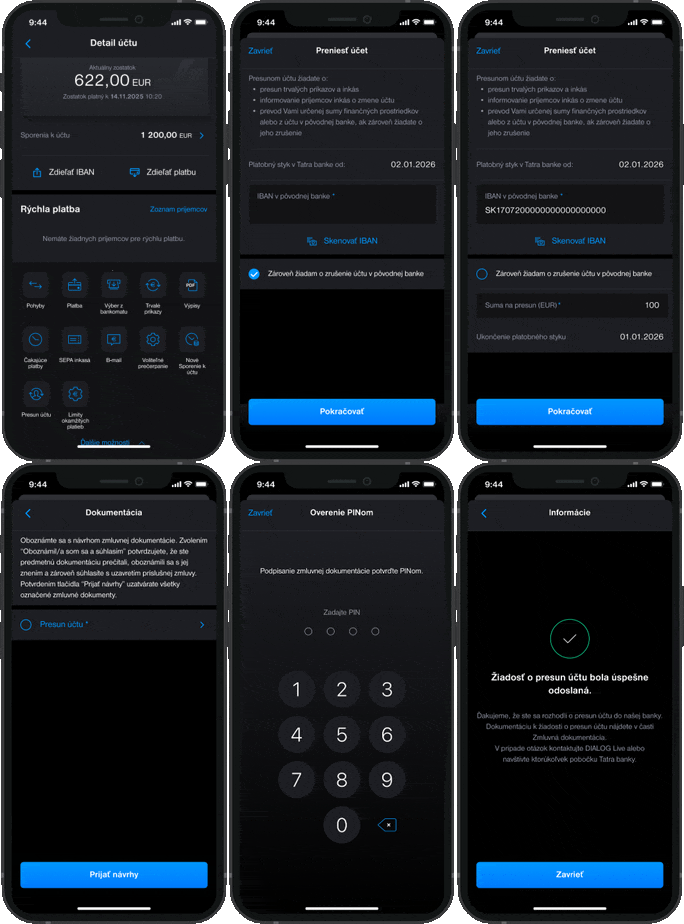
Account switching in the Tatra banka mobile app
1. Switching request
In the app, in the account detail, click the Account switching icon.
2. Switch account
Enter or scan the IBAN of the account being switched.
If you do not wish to close the account at your original bank, untick this preselected option and enter the amount to be transferred to your Tatra banka account.
3. Acceptance of proposals
Read the draft contractual documentation.
4. Request confirmation
Confirm the submission of the account switching request by entering your PIN code.
5. Done! The request has been sent.
The request has been registered, and you can monitor its processing status directly in the Tatra banka app.
Frequently asked questions
This is the transfer of payments, direct debits and funds from the transferring payment service provider (the "Old Bank") to the receiving payment service provider (the "New Bank") with the option of canceling a payment account with the Old Bank.
Yes. The request can only request the transfer of some payment services or all payment services.
Of course. Transferring a payment account is not subject to opening a new account. The transfer of payment services from Old Bank can also be requested to an existing account in Tatra banka.
The payment account transfer service is intended for the consumer. When transferring a payment account, a person who employs less than ten persons at the time of the conclusion of the framework payment service contract and whose annual turnover or total annual balance sheet value does not exceed 2 000 000 EUR shall always be considered to be a consumer.
The transfer of a payment account can only be requested by a person who is an account holder in the Old Bank, or by another person on the basis of authorization by the account holder. If the account in the Old Bank has several owners, the transfer request must be signed by all owners.
https://www.tatrabanka.sk/en/personal/account-payments/account-switching/