



Enter the phone number below in the format +4219xx xxx xxx or 09xx xxx xxx and we will send you an SMS with a link to download the Tatra banka mobile application, or scan the QR code.
Pay with a watch, ring or bracelet
Choose a watch with Garmin Pay or a payment accessory to match your style. Add your Tatra banka card and pay conveniently and securely.
Choose what you want to pay with
Wearable devices today offer many more options than just smartwatches.
Payment by watch
Choose a sports smartwatch or a classic model you can use every day.
Payment by ring
A payment ring looks like jewellery and is easy to combine with other accessories.
Payment by bracelet
A payment bracelet keeps your hands free during active days and while travelling.
Payment by other accessories
Choose a key fob, strap or pendant that stands out with its design and replaces your card.
Payments as part of your day
- From training straight to shopping
Your watch measures your sports performance and after training you can pay with it right away. - An accessory you will love
A ring or bracelet complements your style and is always at hand when paying. - No charging worries
You can wear selected payment accessories all day without the need to charge them.
Choose from tested brands
See the brands whose devices we have tested with Tatra banka cards.
Watches



Rings and bracelets



Tapster
Rings and bracelets for various occasions
With code TATRABANKA40 you get a 40 % discount
View devicesHow to add a card to your wearable device
You can add your card to a watch or payment accessory via the manufacturer’s app, such as Garmin Connect, Niceboy Pay, LAKS Pay or Tapster.
1. Add a device
Open the manufacturer’s app and add the device you want to use for payments.
2. Add a card
Enter your card details and select Online bank verification.
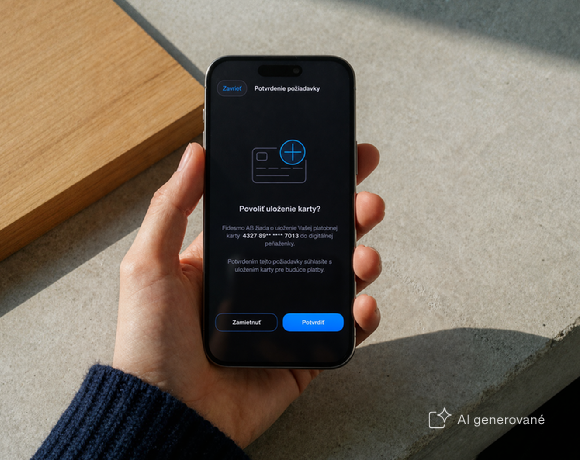
3. Confirm adding the card
In the Tatra banka app, check the details and confirm adding the card.
4. Complete the setup
Return to the manufacturer’s app and follow the on-screen instructions.
How many cards can you add?
- To a watch, you can add multiple payment cards.
- To a ring, bracelet or other device without a display, you can add one card.
How to set up Garmin Pay
-
In the Garmin Connect app, select the watch to which you want to add the card.
-
Open Garmin Pay, create a wallet and set a security code.
-
Select Add card and enter the details from your card.
-
Select Online bank verification.
-
In the Tatra banka app, check the details and confirm adding the card.
-
Return to the Garmin Connect app and complete the setup according to the instructions.
How to pay with a watch
-
Open the payment wallet on your watch.
-
Select the card you want to pay with.
-
Hold the watch near the contactless terminal and confirm the payment if required.
The exact procedure may vary depending on the watch model.
Which Tatra banka cards you can use
You can add a Visa debit or credit card from Tatra banka to your device. Both private and business cards are supported.
To add a card, you need to have the Tatra banka app activated. The minimum age for using the service is 15 years.
Don’t have a Tatra banka card yet?
Choose a debit card linked to your account or a credit card with a financial reserve.
Payments under control
Limits for payments by ring, bracelet and pendant
- The same limits as for your card
For contactless payments, the limits set on your payment card apply. - Up to 50 EUR without a PIN code
You can pay by ring, bracelet or pendant up to 50 EUR without entering a PIN code. - Over 50 EUR with a PIN code
For payments over 50 EUR, enter the PIN code for your payment card.
Secure payments with a watch and other devices
- Secure card adding
You confirm adding the card online in the Tatra banka app. - Card details remain protected
The merchant does not see the actual number of your payment card. - You can pause payments at any time
You can pause payments and remove the card directly in the device app.
You can adjust the daily payment limit and cash withdrawal limit at an ATM in the Tatra banka app via Online Card Management.
Frequently Asked Questions
Does Tatra banka support Garmin Pay?
Yes. You can add your Visa card from Tatra banka to compatible Garmin watches and pay via Garmin Pay.
Which Garmin watches support Garmin Pay?
You can use Garmin Pay with Garmin watches that support this service. You can find the current list of compatible models on the Garmin website.
Which watch payments does Tatra banka support?
You can add your Tatra banka card to watches that support a compatible payment solution by Digiseq and Fidesmo Pay providers. From the tested options, we recommend Garmin sports watches, Swatch designer watches and Honor smartwatches.
Which payment rings does Tatra banka support?
You can add your Tatra banka card to rings with a supported payment solution by Digiseq and Fidesmo Pay providers. From the tested options, we recommend rings from Niceboy, LAKS and Tapster.
Can I also use a device that is not listed on this page?
Yes, if it supports a payment solution by Digiseq and Fidesmo Pay providers compatible with your payment card from Tatra banka. This page lists tested devices and brands, but it is not a complete list of options available on the market.
Do I have to charge a payment ring or bracelet?
It depends on the specific device. Selected rings, bracelets and other payment accessories work without a battery and charging. Devices with smart features may require charging.
Can I withdraw cash from an ATM using a watch, ring or bracelet?
Yes, if withdrawals are supported by the specific device and payment solution, and the ATM has a contactless function. When making a withdrawal, you enter the PIN code for your payment card. The withdrawal is counted towards the cash limit set on the card.
What should I do if I lose my device?
In the app intended for the given device, pause payments or remove the added card as soon as possible, or contact DIALOG Live.
https://www.tatrabanka.sk/en/personal/cards/wearables/